Robot Vacuums in Older Homes: Rugs, Thresholds and Stairs
Older houses have doorways, rugs with tassels and stairs that trip up robot vacuums, so here is what actually matters before you spend the money.

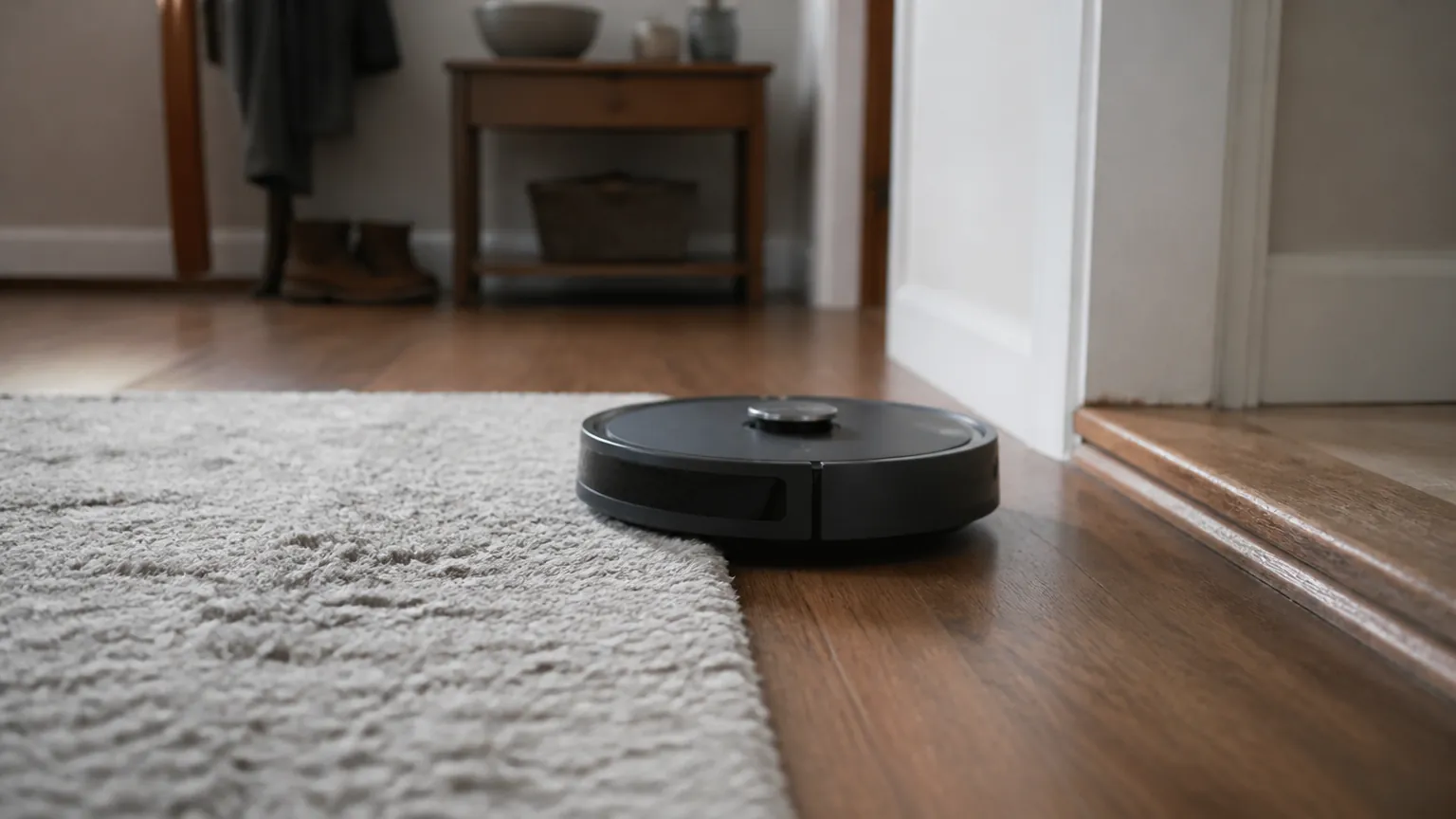
Robot vacuums are sold in bright, open showrooms with flat floors and not a doorway in sight. Real homes, especially older ones, are nothing like that. You might have a hallway that steps up into a living room, a woven rug with tassels, carpet in the bedrooms and tile in the kitchen, and a flight of stairs the robot can never climb. None of that makes a robot vacuum a bad idea, but it does change which features matter and which are just marketing. This guide walks through the things that trip up these machines in a lived-in house, what to look for on the spec sheet, and roughly what one costs to run once it is parked in the corner.
Thresholds: the quiet dealbreaker
The single most common complaint in older homes is thresholds, the raised strips of wood or metal in doorways and between rooms. If the robot cannot climb them, half your house is off limits and you end up carrying the machine from room to room, which defeats the point.
Most robot vacuums claim they can climb an obstacle of around 2 cm, roughly three-quarters of an inch. In practice, many manage 1.5 to 2 cm reliably and start to struggle or beach themselves above that. Older homes often have thresholds taller than you would guess, and the transition between a hard floor and a thick rug counts as a climb too. Before you buy, measure your worst threshold with a ruler and compare it against the maximum the manufacturer states. Treat the quoted figure as optimistic rather than guaranteed.
A few higher-end models now advertise an extendable foot or small lift mechanism to clear 3 cm or more, but these cost more and add parts that can fail. If you only have one awkward step, a cheap ramp or a small change to a doorway strip may be a better fix than paying for the fancy chassis.
Rugs, tassels and carpet depth
Rugs are where older homes and robot vacuums disagree most. The problems fall into a few groups.
- Tassels and fringes: spinning brushes grab them, wind them in and either stop dead or drag the rug across the room. There is no clever software fix. If a rug has long fringes, you will likely need to fold them under or set a no-go zone around it.
- High-pile and shag rugs: deep pile above about 2 cm bogs down the wheels and the brush. Many robots simply avoid thick rugs or ride up and get stuck. Low, flat-weave rugs are far friendlier.
- Dark or patterned rugs: some robots use a downward sensor to detect drops (so they do not fall down stairs). Very dark rugs can read as a cliff, and the robot refuses to cross them. This is commonly reported rather than universal, so check reviews for your specific model if you have black rugs.
- Loose or lightweight rugs: the robot pushes them into a heap. Rug grippers or anti-slip underlay help here regardless of which machine you buy.
On suction, the numbers are vague because manufacturers measure differently. Suction is usually quoted in pascals (Pa), with budget models around 2,000 Pa and stronger ones claiming 5,000 to 8,000 Pa or more. Higher Pa helps on carpet, but a good brush design and the robot's ability to boost power when it detects carpet matter just as much. If most of your floors are carpet rather than hard, lean toward a model that advertises automatic carpet boost, and do not expect any robot to match a decent upright vacuum on thick carpet.
Mapping, multiple floors and getting lost
Open-plan showrooms flatter robot navigation. A warren of small rooms and hallways is harder. Cheaper robots that bounce around randomly will eventually cover a room but miss corners and take a long time. Models with lidar (a small spinning laser turret on top) or camera-based mapping build a plan of your home, clean in neat rows and let you send the robot to one room from an app.
For a house with several rooms, mapping is genuinely useful. Look for the ability to save multiple maps or multiple floors. Here is the catch: the robot cannot climb stairs, so a multi-floor map only helps if you carry the machine upstairs and it recognizes where it is. Many mid-range and upper models now store two or three floor maps. If you have a two- or three-story home and want one robot to cover all of it, that feature is worth paying for. If you only ever use it on one level, you can skip it.
A word on privacy, since camera-based robots send data to apps and sometimes to the cloud. Rules differ by region: the UK and the rest of the European-style framework fall under GDPR-style data protection, Australia has the Privacy Act and its Australian Privacy Principles, and the US relies on a patchwork of state laws with California among the strictest. In plain terms, check whether the app lets you keep maps on the device, turn off data sharing, and delete your account cleanly. Treat a robot with a camera as another internet-connected device in the house.
Self-emptying bases, filters and real running costs
A self-emptying base is a dock that sucks the dirt out of the robot into a larger bag, so you empty it every few weeks instead of after most runs. It is convenient, and genuinely helpful if you have limited hand strength or a lot of pet hair. It also adds ongoing costs and noise.
The bags are the main consumable. Replacement dust bags commonly cost around $4 to $8 each (roughly £3 to £6, or A$6 to A$12) and typically last four to eight weeks depending on how much the robot picks up. Filters need replacing too, often every few months, at around $10 to $25 for a pack. Bagless docks exist and avoid the bag cost, but you empty a small bin more often and clean it by hand.
Electricity is the small part. A robot vacuum uses very little power, maybe 30 to 60 watts while cleaning and a few watts while docked and charging. Say it cleans for an hour a day at 40 watts, that is 0.04 kWh per run, about 14.6 kWh a year. At roughly 17 US cents per kWh that is about $2.50 a year; at about 25p in the UK around £3.65; at roughly 30 Australian cents around A$4.40. Prices differ by country and by your own tariff, but the pattern holds: the electricity is cheap, and the bags and filters are what actually cost you over time. Budget somewhere in the region of $40 to $100 a year for consumables on a self-emptying model, and close to nothing beyond power on a basic one.
Noise and who gets real value
Robot vacuums run at roughly 55 to 70 decibels, similar to a dishwasher or a normal conversation at the louder end. That is quieter than an upright vacuum, but the self-emptying dock is loud for its 10 to 20 seconds of operation, often 75 decibels or more, which can be startling if it fires while you are on a call or the baby is asleep. Many apps let you schedule cleaning and set quiet hours, which is worth using.
Who gets the most out of one
- Good fit: mostly hard floors or low-pile carpet, few or low thresholds, pets or allergies that benefit from daily light cleaning, and a willingness to tidy cables and fringes out of the way.
- Harder fit: lots of deep rugs with tassels, high thresholds between most rooms, or a house spread over several floors where you will not carry the robot around.
- Probably not worth it: if your main problem is thick carpet and you want it properly clean, a corded upright or a good cordless stick is cheaper and does the job better. A robot handles maintenance, not a deep clean.
Quick spec-sheet comparison
| Feature | Why it matters in an older home | What to check on the spec sheet |
|---|---|---|
| Threshold climb height | Decides whether the robot reaches every room or gets stranded | Maximum obstacle in cm or inches; compare to your tallest doorway strip |
| Carpet handling | Older homes often mix hard floors and carpet | Suction in Pa and whether it has automatic carpet boost |
| Navigation | Small rooms and hallways confuse random-path robots | Lidar or camera mapping; saved room zones and no-go areas |
| Multi-floor maps | Lets one robot cover several levels if you carry it | How many floor maps it stores (2 or 3 is common) |
| Drop sensors | Stops falls down stairs; can misread dark rugs | Cliff-sensor mention; reports of trouble on dark flooring |
| Self-emptying base | Convenience versus ongoing cost and noise | Bag price and life; bagless option; dock noise in dB |
| Filters | Regular replacement cost, matters for allergies | Filter type, replacement interval, pack price |
| Noise | Affects when you can run it | Cleaning dB and whether quiet hours can be scheduled |
One safety note worth stating plainly: keep charging docks away from where water might reach them, and if you have young children, be aware that a robot's dock plugs into the mains and the robot's moving brushes can catch small fingers or long hair. Mains voltage differs by region, around 120 volts in the US and Canada and about 230 to 240 volts in the UK and Australia, so buy a model sold for your market with the correct plug rather than importing one and using a travel adapter.
The short version
- Measure your tallest threshold first; if the robot cannot climb it, half your house is off limits.
- Tassels, thick rugs and very dark rugs cause the most trouble, and no software fully fixes them.
- For several small rooms, lidar or camera mapping is worth it; multi-floor maps only help if you carry the robot upstairs.
- Electricity is cheap, roughly $2.50 to A$4.40 a year, but self-emptying bags and filters can run $40 to $100 a year.
- If thick carpet is your real problem, a good upright or cordless stick cleans better for less; a robot is for daily upkeep.
Emma Clarke
Home & Kitchen writer · Melbourne
Emma covers home and kitchen gadgets, from smart plugs to air fryers. She focuses on what things really cost to buy and run at home, and on the features that matter once the novelty wears off.
Keep reading
Do Smart Plugs Actually Save Money? The Real Running Costs
Smart plugs promise to cut your bills by killing standby power, but the numbers are smaller than you might expect. Here is the honest math.
What Is an OBD2 Scanner, and Do You Actually Need One?
That little socket under your dashboard can tell you why the check engine light is on. Here's what a scanner reads, what it costs, and who really benefits.
Hidden Car Features: What 'Coding' Can Unlock on VW, Audi and BMW
Many German cars ship with features switched off in software. Here is what coding through the OBD port can turn on, and the risks worth knowing first.
Comments
No comments yet. Share your experience or ask a question.