Amazon Fire TV Stick Review: Is the 4K Max Worth It?
A level-headed look at the newest Fire TV Stick 4K Max, weighing fast navigation and Wi-Fi 6E against the ad-heavy home screen owners complain about.

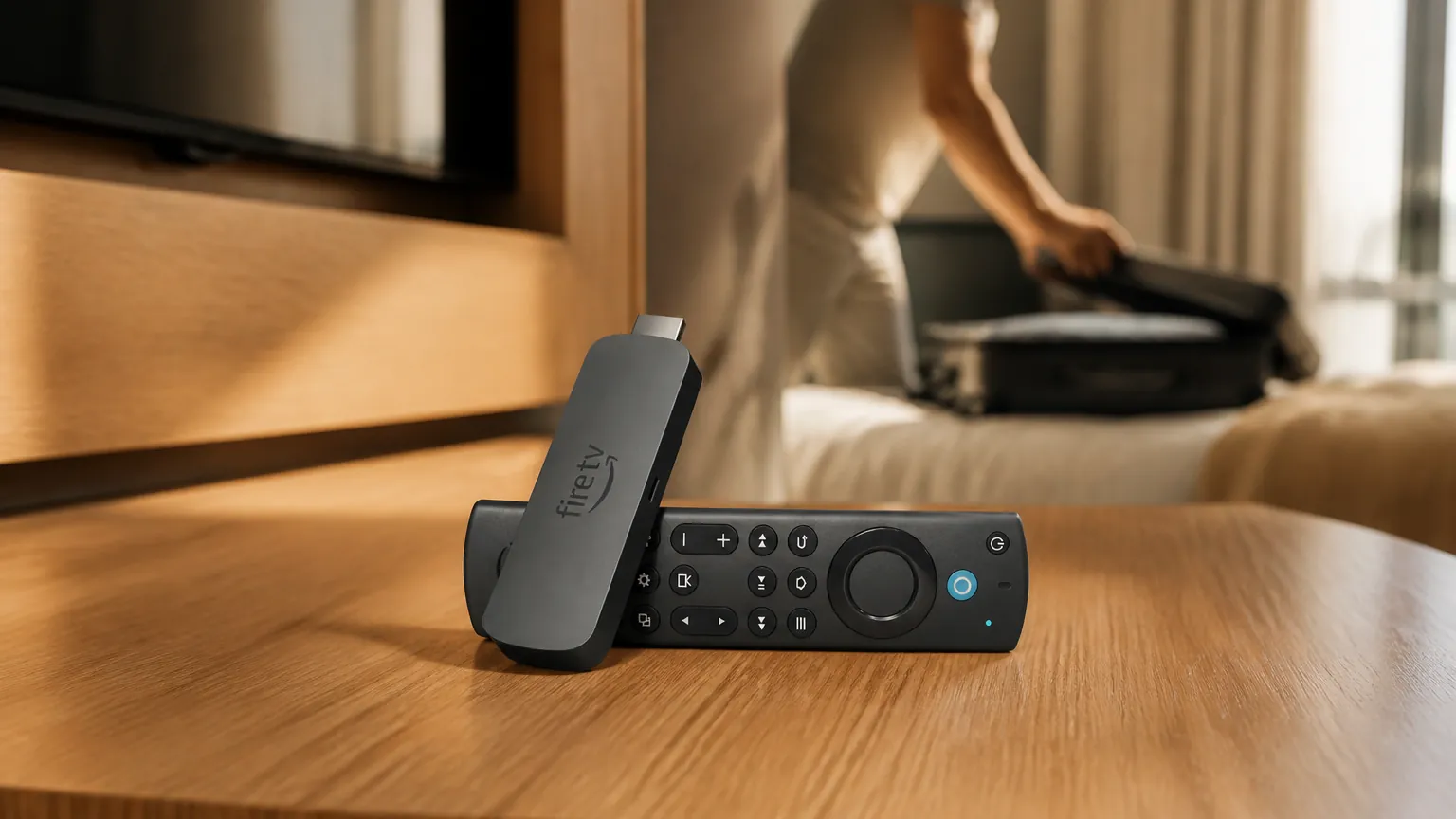
This amazon Fire tv stick review looks at the Fire TV Stick 4K Max (newest model), a small streaming device that plugs into your TV's HDMI port and gives you Netflix, Prime Video, Disney+, HBO Max, YouTube and free live channels, all driven by Amazon's Fire TV software and an Alexa voice remote. It's aimed at practical people who want to modernize a tired smart TV or replace an older, slower streaming stick without spending a lot. We have not tested this device ourselves. Instead, this review brings together Amazon's own specifications with what owners and hands-on reviewers report, so you can see where the marketing and the real-world experience line up, and where they don't.
What you get
The 4K Max is a stick a little larger than a USB thumb drive that hangs off the back of your TV, powered by a USB cable and adapter. It streams in 4K Ultra HD with Dolby Vision, HDR10+ and Dolby Atmos, and comes with an Alexa Voice Remote that controls your TV's volume and power. In the box you get the stick, the remote, an HDMI extender, a USB cable, a power adapter and two AAA batteries. One thing to note up front: there is no HDMI port shortage to worry about, but the microUSB power port means you should keep the supplied cable.
| Model number | K3R6AT |
| Generation | 2nd Generation (2023) |
| Processor | 2.0 GHz quad-core MediaTek MT8696T |
| GPU | PowerVR GE9215 |
| RAM | 2 GB |
| Storage | 16 GB |
| Max resolution | 4K Ultra HD (2160p) up to 60fps |
| HDR | Dolby Vision, HDR10+, HDR10, HLG |
| Audio | Dolby Atmos, Dolby Digital Plus |
| Wi-Fi | Wi-Fi 6E (tri-band, 6GHz) |
| Bluetooth | 5.2 LE |
| Operating system | Fire OS 8 (Android 11) |
| Ports | HDMI 2.0, microUSB (power) |
| Dimensions | 108 x 30 x 14 mm |
| Operating temperature | 0-35°C (32-95°F) |
| In box | Stick, Alexa Voice Remote Enhanced, HDMI extender, USB cable, power adapter, 2 AAA batteries |
This is the part that trips people up. Amazon markets this 2nd-generation Max (model K3R6AT, launched in late 2023) as the "newest" 4K Max in 2026, but it looks almost identical to the older 1st-gen Max from 2021. The casing, remote and "Max" name are nearly the same. The reliable way to tell them apart is to check the box for three things: 16GB storage, Wi-Fi 6E and a 2023 date. The 1st-gen Max has only 8GB storage, Wi-Fi 6 (not 6E) and older software. It's also easy to confuse with the cheaper standard Fire TV Stick 4K (half the storage, less RAM, a slower 1.7GHz chip, Wi-Fi 6 only) and with the budget HD, 4K Select and 4K Plus sticks, which use slower chips and less memory.
What owners like
Across owner reviews and hands-on write-ups, a few themes come up again and again. The praise tends to focus on speed, picture quality and value rather than anything flashy.
- Fast, responsive navigation: Owners consistently say menus, app launches and switching between recently used apps feel noticeably snappier than older Fire sticks, which they credit to the faster processor and extra RAM.
- Clean 4K HDR picture: It handles Dolby Vision, HDR10+ and Dolby Atmos, and reviewers report smooth playback from Netflix, Prime Video, Disney+ and YouTube with good detail and balanced color.
- Wi-Fi 6E for steadier streaming: This is the only streaming stick with Wi-Fi 6E, and owners on busy networks report fewer buffering events and faster loads. The catch is that you only get the benefit if you own a Wi-Fi 6E router.
- Double the storage: The 16GB of internal storage is twice that of the standard Fire sticks, letting owners install more apps, games and downloads. It's a frequently cited reason people upgrade from an older stick.
- Strong value and cloud gaming: It typically sits in the budget-streamer price bracket, undercutting rivals, and adds cloud gaming through Amazon Luna and Xbox Game Pass, so owners can play without a console.
- Easy setup and handy voice remote: Owners find setup simple, especially if they already have an Amazon account, and praise the Alexa remote for quick voice commands plus TV volume and power control.
- Plenty of free live TV: People replacing tired smart-TV apps appreciate the large app catalog and the built-in free, ad-supported live channels, which can help them drop the cable box.
Common complaints
The grumbles are just as consistent as the praise, and a couple of them are enough to send some buyers elsewhere.
- Ad-heavy, cluttered interface (common): By far the most frequent complaint is that the Fire TV home screen is crowded with sponsored ads and promoted content. Some owners find it intrusive enough to switch to Roku, Apple TV or an onn box.
- Buffering and occasional lag (some owners): A minority report buffering, particularly on live-TV services like Sling and YouTube TV, plus the odd navigation stutter or freeze. Owners with good routers often see none, so this frequently traces back to the home network.
- Remote feels cheap, no input button (some owners): Some owners say the remote is smaller, lighter and cheaper-feeling than expected. There's no dedicated input-select button, so switching HDMI sources means reaching for your TV's own remote. A few report trouble pairing the remote.
- Modest upgrade over the older Max (common): Reviewers note the performance gains over the 1st-gen Max aren't dramatic, so owners of a recent 4K Max have little reason to upgrade unless they specifically want Wi-Fi 6E or more storage.
- Bluetooth and gaming quirks (occasional): Some owners report poor Bluetooth range and input lag with game controllers or Steam Link/Moonlight. There's also no 3.5mm headphone jack on the remote, so private listening means pairing Bluetooth headphones.
- Occasional black-screen and bugs (occasional): A few owners describe black screens that need a reboot, HDR glitches fixed only by turning HDR off, and the Amazon video app failing inside Amazon Kids mode.
Running costs and upkeep
This device uses very little power, so the running cost is negligible. Amazon's compliance page lists the included adapter at 5W output, with networked standby around 0.6W and off mode around 0.28W; the device drops into network standby after about 20 minutes idle. Independent bench testing of the 2nd-gen measured roughly 3.5W in use and up to about 5W maximum. At roughly 4W, even several hours of daily 4K streaming adds up to only a few kWh a year. To put a worked figure on it: at about 17 US cents per kWh, around 25p in the UK or about 30 Australian cents, that still comes to well under a few dollars or pounds a year, which is why we'd call it a rounding error on your electricity bill.
There are no consumables beyond the two AAA remote batteries, which last a long time in normal use. Cleaning is just an occasional wipe of the remote with a dry cloth. Some apps and services carry their own subscription fees, which Amazon states plainly, and cloud gaming through Luna is included free with a Prime membership. On warranty, Amazon provides a One-Year Limited Warranty covering defects in materials and workmanship under ordinary consumer use, for one year from the original retail purchase date. Repairs or replacements are warranted for the rest of the original period or 90 days, whichever is longer, and the warranty excludes accident, misuse, neglect and commercial use. If you buy the Alexa Voice Remote separately, it carries only a 90-day warranty. No recall or safety notice was found for this model; Amazon does note the device should be used indoors when operating on certain Wi-Fi 6E bands, which is a standard regulatory requirement rather than a fault. UK and Australian versions ship with the appropriate local plug and run on local mains voltage.
How it compares
These are the devices owners most often weigh against the 4K Max.
| Device | How it compares |
| Fire TV Stick 4K Max (this one) | Fast navigation, 16GB storage and the only stick with Wi-Fi 6E; let down by an ad-heavy home screen and a basic remote. |
| Roku Streaming Stick 4K | Owners who dislike Fire TV's ads often move to Roku for its simpler, sometimes snappier interface, and its remote has a headphone jack. But it's Wi-Fi 6 only, not 6E. |
| Apple TV 4K | Described as faster, smoother and essentially ad-free, making it the premium pick, but it costs roughly three times as much. The Fire Max matches it on Dolby Vision and Atmos and adds Wi-Fi 6E and a larger niche-app catalog. |
| Chromecast with Google TV (4K) | A same-price rival with Google TV built in. Reviewers rate the Fire Max ahead on raw hardware and the only Wi-Fi 6E radio, while noting Google's film-grain handling can look slightly noisier. |
It's also worth comparing it against its own cheaper sibling, the standard Fire TV Stick 4K. That model has half the storage, less RAM, a slower chip and only Wi-Fi 6. Reviewers say the Max is worth the small premium only if you have a Wi-Fi 6E router or plan to install many apps; otherwise the standard stick is perfectly fine.
Who should buy it, and who should skip it
- You're replacing an old, sluggish streaming stick and want faster menus.
- You own a Wi-Fi 6E router and have a busy home network.
- You install plenty of apps or games and want the 16GB of storage.
- You fancy occasional cloud gaming through Luna without buying a console.
Who should skip it:
- You can't stand ads on your home screen; Roku or Apple TV will suit you better.
- You already own a recent 4K Max, where the upgrade is modest.
- You want a headphone jack on the remote for private, late-night listening.
Our Amazon Fire TV Stick review verdict
The Fire TV Stick 4K Max (2nd gen) does the important things well. Owners report fast, fluid navigation, a clean 4K HDR picture across all the major formats, and genuinely useful extras in Wi-Fi 6E and 16GB of storage. For the money, it's a lot of streaming stick, and the voice remote and easy setup make it approachable for people who don't want to fiddle. If you're upgrading from an older or budget stick, the improvement should be obvious, and the running cost is so small it barely registers.
The reservations are just as clear. The home screen's ads and clutter are the most common complaint by far, and for some people that alone is a deal-breaker worth paying more for a Roku or Apple TV to avoid. The remote feels cheap to some and lacks an input button and headphone jack, a minority see buffering that usually points back to their network, and owners of a recent 4K Max won't find enough here to justify switching. Check the box carefully for 16GB, Wi-Fi 6E and 2023 so you don't buy the older look-alike by mistake, then decide based on the current price on Amazon and how much those ads are likely to bother you.
As an Amazon Associate we earn from qualifying purchases.
Sources
This review brings together the maker's specifications and what owners report. We have not tested the Fire TV Stick 4K Max (Newest Gen) ourselves. Product details checked November 20, 2026.
Tom Ashworth
Sleep, Health Tech & Travel writer · Manchester
Tom writes about sleep and health tech, travel gadgets and outdoor gear. He looks past spec sheets to how a gadget fits into everyday life, and he is wary of health claims that go beyond the evidence.
Keep reading

Kindle Scribe Review: Color Comes at a Price
The Kindle Scribe Colorsoft adds a color screen and a bigger body to Amazon's note-taking e-reader, but owners are split on whether the upgrade is worth it.

Kindle Paperwhite Review: An Honest Look at the 2024 Model
The 2024 Kindle Paperwhite brings a bigger screen and longer battery life, but is the modest upgrade worth it? Here's what the specs and owners say.
JBL Flip 6 Review: Rugged Sound in a Carry-Anywhere Size
The JBL Flip 6 is a compact waterproof speaker with punchy bass, but its battery and volume limits mean it isn't right for everyone who's tempted.
Comments
No comments yet. Share your experience or ask a question.