Kindle Scribe Review: Color Comes at a Price
The Kindle Scribe Colorsoft adds a color screen and a bigger body to Amazon's note-taking e-reader, but owners are split on whether the upgrade is worth it.

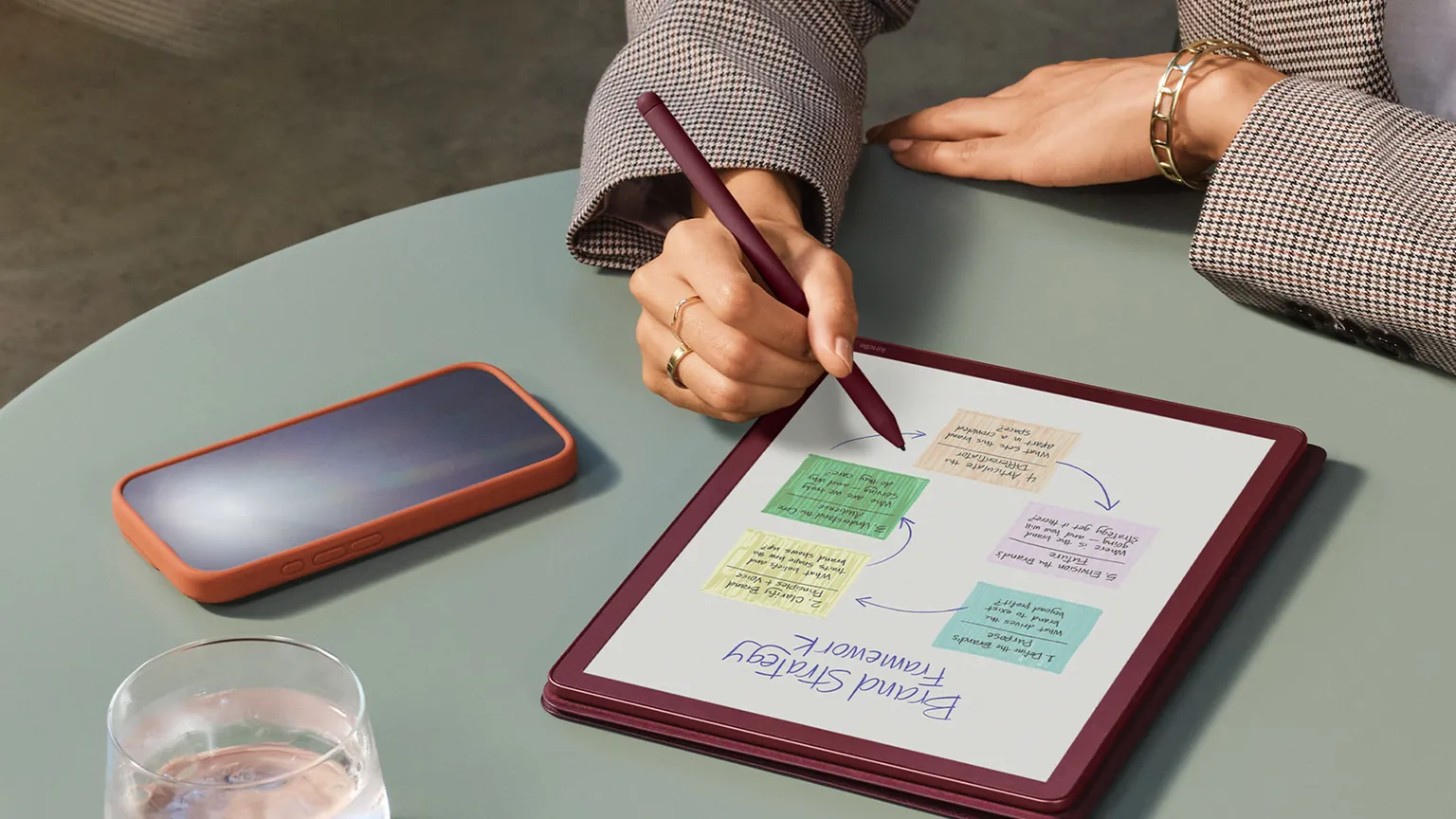
This Kindle Scribe review looks at the Amazon Kindle Scribe Colorsoft in its 64GB, Graphite form — the first Kindle Scribe to use a color e-ink screen. It's a large, 11-inch e-reader you can also write on, aimed at people who read a lot of Kindle books and want to scribble notes, annotate documents and keep a digital notebook in one place. It is not a tablet and not a laptop replacement; it's a purpose-built reading and writing device with no apps or notifications. We have not used or measured this device ourselves. This review brings together Amazon's own specifications and what owners and independent reviewers report, so you can see where the marketing and the real-world experience line up — and where they don't.
What you get
The Kindle Scribe Colorsoft is an 11-inch e-reader with a color e-ink screen, a front light and a pen included in the box. You can read books, mark them up, take notes in a built-in notebook, import documents and export annotated PDFs. The headline change over previous Scribes is the color panel; the body is also thinner and the screen bigger than the older mono Scribe.
| Display | 11-inch Colorsoft oxide/Kaleido 3 color e-ink with front light |
| Resolution | 300 ppi black & white, 150 ppi color; 16-level gray scale |
| Storage | 64GB (also sold in 32GB) |
| RAM / chip | 4GB RAM, new quad-core ~2GHz processor |
| Weight | 400g (14.1oz); Premium Pen 17g (0.6oz) |
| Dimensions | 189 x 245 x 5.4mm |
| Writing latency | ~11–12ms (measured by reviewers) |
| Battery (reading) | Up to 8 weeks at 30 min/day, Wi-Fi off, brightness 13 |
| Battery (writing) | Up to 2 weeks at 30 min/day, Wi-Fi off, brightness 13 |
| Connectivity | Wi-Fi, Bluetooth (Audible), USB-C |
| Pen | Premium Pen included, no charging, built-in eraser and shortcut button |
| Colors | Graphite, Fig |
| Waterproof | No |
This model is easy to mix up with look-alikes. It is not the smaller 2024 Kindle Colorsoft e-reader that had a widely reported "yellow band" display fault — that defect does not apply here, and Scribe Colorsoft owners are not reporting it. It is also distinct from the non-color Kindle Scribe (3rd gen), which shares the same body but lacks the color panel and costs less. The same Scribe Colorsoft is sold in a "Fig" purple finish and in a 32GB version. If you only want one in Graphite with the larger storage, the 64GB Graphite is the one described here.
What owners like
Owners and independent reviewers are broadly positive about the hardware and the reading experience, with praise falling into a few consistent areas.
- Big, premium, light build: the thin 5.4mm, 400g aluminum body and larger 11-inch screen are described as a genuine quality-of-life upgrade over the older 10.2-inch mono Scribe, for both reading and writing.
- Excellent reading: for text it's treated as a top-tier Kindle, and the subtle color works especially well for comics, manga, art books and illustrated content without looking as washed out as some other color e-ink screens.
- Fast, smooth writing: writing latency is measured at roughly 11–12ms, which reviewers call competitive, and the new quad-core chip makes page turns noticeably quicker — about 40% faster by Amazon's reckoning.
- Long battery life: owners report weeks per charge rather than hours; one multi-week account put Amazon's "8 weeks reading" claim at around six weeks of realistic daily use.
- Pen in the box: the Premium Pen ships with the device, never needs charging, and has a built-in eraser and shortcut button — a bundle advantage over the reMarkable Paper Pro, whose basic marker lacks an eraser.
- Kindle ecosystem and extra tools: direct access to the Kindle Store, plus Google Drive and OneDrive import, PDF export, OneNote sending, and AI handwriting search and summaries, make it strong for readers who also annotate.
- Distraction-free, plus audiobooks: owners value a device built only for reading and writing, with no apps or notifications, and unlike the Paper Pro it can play Audible audiobooks over Bluetooth.
Common complaints
The criticisms are just as consistent, and several of them matter a great deal depending on how you plan to use the device.
- Very expensive (common): this is the priciest Kindle yet, and reviewers repeatedly say the step up over the cheaper mono Scribe is hard to justify for most buyers. Check the current price on Amazon before you decide.
- Muted, pastel colors (common): because color renders at only 150 ppi on a Kaleido 3 panel, hues look soft and watercolor-like rather than vivid, and the screen can read dark unless the front light is at moderate-to-high brightness.
- Basic, clunky note and PDF software (common): several reviewers call the note-taking and annotation tools limited and fiddly next to reMarkable — you can't zoom in native notes, and importing documents relies on the separate Send to Kindle app.
- Softer mono text (some owners): the most-cited Reddit complaint is that the color filter layer makes black-and-white text slightly softer than on the plain mono Scribe, which bothers some daily readers.
- Pen pressure regression (some owners): reviewers found the bundled pen's pressure response miscalibrated, with too little range at light pressure — a step back from earlier Scribes that shows up most with brush and calligraphy tools.
- Occasional freezes and no waterproofing (occasional): a highlighting action occasionally froze a review unit until it was restarted from the Home screen, and the device is not waterproof and is awkward to use one-handed.
Running costs and upkeep
There's no meaningful energy maths to do here, and it's worth saying why. This is an e-ink device: it only draws power when the screen image changes, which is why owners get weeks per charge rather than hours. Amazon rates the battery at up to eight weeks of reading (30 minutes a day) or up to two weeks of writing, with Wi-Fi off and brightness at 13. The color layer itself doesn't drain extra power; only color rendering and front-light use shorten battery life a little. Even if you charged it fully every week over USB-C, the electricity cost would be a tiny fraction of a cent at around 17 US cents, 25p or 30 Australian cents per kWh — so small it isn't worth calculating.
There are no consumables and no mandatory subscription to read your own books or take notes. The included Premium Pen never needs charging. For cleaning, treat it like any screen: a dry or barely damp microfiber cloth, no harsh cleaners, and keep it away from water since it isn't waterproof. On warranty, Amazon lists the Kindle Scribe Colorsoft and the in-carton Premium Pen under a One-Year Limited Warranty covering defects in materials and workmanship under ordinary consumer use, for one year from original retail purchase; it excludes accident, misuse and commercial use. A Premium or Basic Pen bought separately carries only a 90-Day Limited Warranty. This applies in the US and UK; the device charges over USB-C, so there's no country-specific plug to worry about, though check local warranty terms where you buy.
How it compares
Owners most often weigh the Scribe Colorsoft against a handful of rivals. The short version: pick the Kindle if you mostly read and occasionally annotate; look elsewhere if writing is the main event or you want to spend less.
| Kindle Scribe Colorsoft | Best for Kindle reading and light annotation; color screen; pen and audiobooks included; note software is basic and color is muted. |
| reMarkable Paper Pro | Larger 11.8-inch screen, more focused writing OS and slightly better writing feel (~9–10ms), but heavier (~525g), no bookstore and no audiobooks. |
| Kobo Elipsa 2E | Cheaper, with more templates, more pen controls and smart handwriting guidance on a more paper-like surface; some prefer the Scribe's smoother glide and metal build. |
| Kindle Scribe (mono, 3rd gen) | Same body, no color, costs significantly less; slightly sharper black-and-white text, and some owners say color isn't worth the premium. |
Who should buy it, and who should skip it
- Heavy Kindle readers who also want to annotate books and documents in one device.
- People who read comics, manga, art or illustrated books and want subtle color.
- Anyone who values a distraction-free device with weeks of battery and a pen in the box.
- People whose main job is writing or marking up PDFs — the note software is limiting, and the reMarkable Paper Pro or Kobo Elipsa 2E may suit better.
- Anyone expecting vivid, saturated color; the pastel look disappoints some buyers.
- Budget-minded readers who'd be just as happy with the cheaper mono Scribe.
Our Kindle Scribe review verdict
The Kindle Scribe Colorsoft is a lovely piece of hardware. The thin, light metal body, the large 11-inch screen, the long battery life and the included pen all land well with owners, and for reading — especially illustrated content — it's treated as one of the best Kindles you can buy. If you live inside the Kindle ecosystem and want to jot notes as you read, it does that gracefully, with fast page turns and smooth, low-latency writing.
The trouble is the price and the trade-offs. This is the most expensive Kindle to date, and several reviewers struggle to justify the jump over the cheaper mono Scribe. The color is muted rather than vivid, the note and PDF software is basic next to dedicated writing tablets, and small issues — softer mono text, a miscalibrated pen at light pressure, the odd freeze, and no waterproofing — add up at this cost. Buy it if you're a dedicated Kindle reader who annotates and genuinely wants color; if writing is your priority, or you simply want to spend less, a rival or the mono Scribe is the smarter choice. Check the current price on Amazon and weigh it honestly against how much you'll really use the color.
As an Amazon Associate we earn from qualifying purchases.
Sources
This review brings together the maker's specifications and what owners report. We have not tested the Amazon Kindle Scribe (64GB) ourselves. Product details checked November 17, 2026.
- Amazon Kindle Scribe Colorsoft Review: After a month, I am not won over — Trusted Reviews
- Kindle Scribe Colorsoft review — TechRadar
- Kindle Scribe Colorsoft review: My favorite Kindle yet — Android Authority
- Kindle Scribe Colorsoft review: This is the Cadillac of Kindles — Tom's Guide
- Amazon's Kindle Scribe Colorsoft wants to take on the reMarkable Paper Pro — Notebookcheck
- Kindle Scribe Colorsoft vs ReMarkable Paper Pro — Tom's Guide
- The Kindle Scribe is great, but the Kobo Elipsa 2E is the better note-taking tablet — TechRadar
- Kindle Scribe Colorsoft review: Great hardware, but the software needs work — Expert Reviews
- Amazon Kindle Scribe Colorsoft review: The luxury ride to digital note-taking — Digital Trends
- Amazon Kindle Scribe Colorsoft gets new model variant (Fig) — Notebookcheck
Tom Ashworth
Sleep, Health Tech & Travel writer · Manchester
Tom writes about sleep and health tech, travel gadgets and outdoor gear. He looks past spec sheets to how a gadget fits into everyday life, and he is wary of health claims that go beyond the evidence.
Keep reading
Amazon Fire TV Stick Review: Is the 4K Max Worth It?
A level-headed look at the newest Fire TV Stick 4K Max, weighing fast navigation and Wi-Fi 6E against the ad-heavy home screen owners complain about.

Kindle Paperwhite Review: An Honest Look at the 2024 Model
The 2024 Kindle Paperwhite brings a bigger screen and longer battery life, but is the modest upgrade worth it? Here's what the specs and owners say.
JBL Flip 6 Review: Rugged Sound in a Carry-Anywhere Size
The JBL Flip 6 is a compact waterproof speaker with punchy bass, but its battery and volume limits mean it isn't right for everyone who's tempted.
Comments
No comments yet. Share your experience or ask a question.